Douglas Engelbart and the Mother of All Demos
Abstract
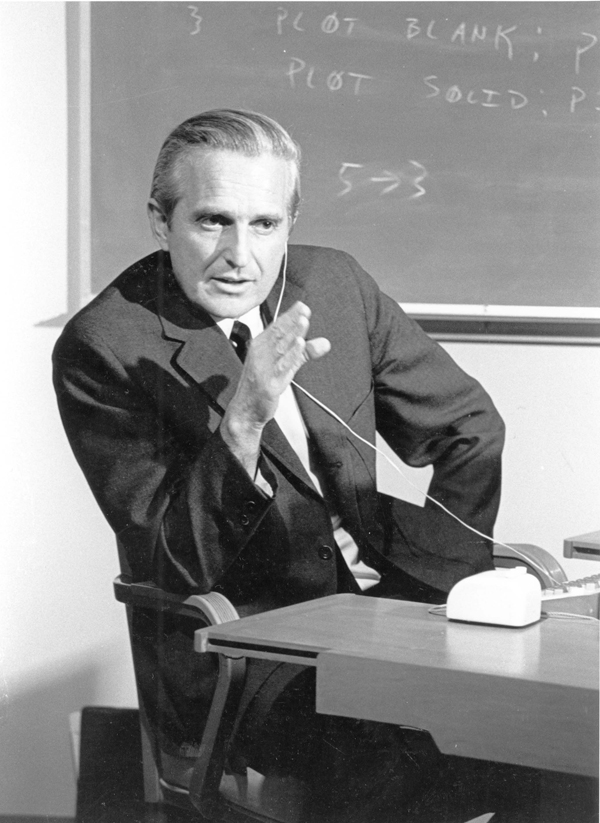
On December 9, 1968, Douglas Engelbart stood before an audience of a thousand computer professionals in San Francisco and demonstrated (in real time, live, with a remote collaborator thirty miles away) the computer mouse, hypertext links, video conferencing, collaborative real-time editing, and a window-based graphical interface. Nobody had shown them working together in one system before, and no audience had yet seen a mouse in use. Stewart Brand helped stage the event; the journalist Steven Levy would later christen it “the mother of all demos” in his 1994 book Insanely Great. Engelbart received a standing ovation. He had been working toward this demonstration for over a decade, funded primarily by NASA and ARPA on the premise that computers should augment human intelligence. Almost none of the money made from those ideas went to him.
A Vision of Augmented Intelligence
Douglas Carl Engelbart was born in Portland, Oregon on January 30, 1925. He grew up in rural Oregon and studied electrical engineering at Oregon State. During World War II he served as a Navy radar technician in the Philippines, an experience that exposed him to the idea that electronic signals could be processed to produce useful displays. He returned to complete his degree, worked briefly at NACA (which became NASA), and pursued a PhD at UC Berkeley, completing it in electrical engineering in 1955.
In December 1950, newly engaged and driving to work, Engelbart realized he had no career goal beyond a steady job, and within weeks settled on one: he pictured a screen, drawn from his radar experience, showing the content of his thinking, allowing him to navigate and restructure his ideas. The image stayed with him. By the time he finished his PhD, he had decided that the most important thing he could do was work on augmenting human intelligence through computing, not just automating tasks humans already did, but extending what humans could think about and how they could think.
He joined Stanford Research Institute (SRI) in 1957 and spent two years struggling to find funding for a research program with no precedent and no obvious application. In 1962, he published a report, “Augmenting Human Intellect: A Conceptual Framework”, that described his vision in precise terms: computers as tools for extending human cognitive capacity, supporting non-linear thinking, enabling collaboration at a distance.
ARPA funded the creation of the Augmentation Research Center (ARC) at SRI in 1963.
Building the NLS
Between 1963 and 1968, Engelbart and his team built NLS (oN-Line System), a complete computing environment designed from the beginning around his augmentation philosophy.
NLS included:
- A mouse for pointing and selecting (patented 1970)
- Hypertext, documents containing links to other documents, navigable by clicking
- Multiple windows, different documents visible simultaneously on screen
- Collaborative editing, multiple users able to edit the same document simultaneously, viewing each other’s cursor
- Structured document organization, hierarchical outlines navigable with keyboard shortcuts
- Video conferencing, users at different locations could see and hear each other while working on shared documents
Engelbart’s team combined all of these in one working system at a time when most computers were still batch-processing machines fed with punched cards.
NLS at the Mother of All Demos (December 9, 1968):

  Input:    Mouse + keyboard (chord keyset for one-handed entry)
  Display:  CRT output relayed as video, split-screen windows
  Features: Hypertext navigation, real-time collaboration,
            structured documents, video conferencing
  Network:  SDS 940 at SRI, leased line (data, 1200-baud modems)
            plus two microwave links (video) to San Francisco
  Audience: ~1,000 at Fall Joint Computer Conference
The Mother of All Demos
On December 9, 1968, at the Fall Joint Computer Conference at the San Francisco Civic Auditorium, Engelbart gave a live demonstration of NLS, starting at 3:45 in the afternoon and lasting 90 to 100 minutes, depending on the account, before about a thousand attendees. He sat at a workstation at the front of the hall; an Eidophor, a Swiss oil-film video projector, threw his display onto a large screen. Two telephone lines with 1,200-bit-per-second modems connected his console to the SDS 940 at SRI. His remote collaborators, Jeff Rulifson and Bill Paxton, were at SRI thirty miles away in Menlo Park, while Bill English directed the production from the hall.
He moved a cursor with a mouse, the first time an audience anywhere saw one demonstrated. What nobody in the hall knew, and history forgot for decades: at that moment a mouse could already be bought: Telefunken in Germany had been selling its independently invented, technically more advanced ball mouse for two months. He created a document, added hypertext links, and navigated them. He opened two windows simultaneously. He shared the display with Paxton and they edited the same document in real time, each seeing the other’s cursor. He video-conferenced with his collaborators in Menlo Park, their faces appearing on the shared display.
The audience (engineers who spent their days submitting punch cards and collecting printouts hours later) saw interactive, graphical, collaborative computing for the first time. The demonstration was given the name “the Mother of All Demos” decades later, but the reaction on the night was already extraordinary: a standing ovation for a research demonstration.
The Other Mouse: Telefunken’s Rollkugel
Engelbart was not alone. Two months before the demo, on October 2, 1968, the German company AEG-Telefunken publicly offered the Rollkugel RKS 100-86, a mouse developed independently by Rainer Mallebrein in Konstanz as an optional input device for the SIG 100 terminal of its TR 86 and TR 440 computers. Conceived in 1966 by “reversing” a trackball Mallebrein’s team had built for German air-traffic control, it already used a rolling ball, the design Bill English would introduce to Engelbart’s lineage only in 1972 at Xerox PARC, and the standard until optical mice. Neither team knew of the other. Telefunken never obtained a patent on it, and accounts differ on why: some say an application was rejected for “insufficient inventive height,” others that the company never filed. Only 46 TR 440 systems were sold or leased, and the parallel invention was forgotten for decades; in 2019 Mallebrein gave one of the few surviving Rollkugeln to the Heinz Nixdorf MuseumsForum in Paderborn. Engelbart’s earlier prototype (1964) and public demonstration keep his priority, but the mouse, like so much in computing, was invented more than once. See Germany’s Computing Pioneers.
The Technology Behind the Demo
The NLS system required enormous resources by 1968 standards: an SDS 940 time-sharing computer at SRI, a leased data line and two microwave video links to San Francisco, custom video hardware, and a specially constructed terminal. The mouse (simple in concept) required Engelbart and Bill English to design its mechanics from scratch. Engelbart’s notebooks put the idea in November 1963; the first detailed description, with a photograph, appeared in a July 1965 report for NASA by Engelbart, English and Bonnie Huddart, which called the cursor a “bug”; a journal article followed in March 1967. The patent for an “X-Y position indicator for a display system”, two wheels at right angles driving two potentiometers, was filed on 21 June 1967 and granted on 17 November 1970. The chord keyset allowed one-handed text entry with five keys in various combinations. None of this technology was commercially available; all of it was built specifically for ARC.
The Tragedy of Non-Recognition
Despite the extraordinary achievement of the 1968 demonstration, Engelbart received almost none of the commercial benefit from the technologies he had invented.
The mouse patent was held by SRI, which licensed it to Apple for a one-time fee of approximately $40,000 in the early 1980s, late in the patent’s life. Engelbart received no royalties.
Xerox PARC, staffed in part by former ARC researchers (Bill English left SRI for PARC in 1971), developed the Alto workstation around NLS concepts. After Steve Jobs’s 1979 visits to PARC, its ideas reached Apple’s Lisa and the Macintosh, whose marketing did not mention Engelbart.
The Visionary Whose Vision Others Commercialized
Engelbart’s tragedy was structural. He was interested in augmenting human intelligence, not in building products. NLS was difficult to learn, and the chord keyset, which let a trained user issue commands without moving the other hand from the mouse to the keyboard, required training. When Xerox PARC and then Apple simplified his concepts for mass-market adoption, they discarded the aspects Engelbart considered most important (structured document organization, collaborative workspace) and kept the easy-to-use features (mouse, windows). Engelbart, who preferred networked, shared computing to the stand-alone personal computer, regarded the result as a loss of the deeper vision.
After ARC passed to Tymshare he worked there from 1978 to 1986, then founded the Bootstrap Institute with his daughter Christina in 1988. Engelbart received the Turing Award in 1997 “for an inspiring vision of the future of interactive computing and the invention of key technologies to help realize this vision” and the US National Medal of Technology in 2000. He died on July 2, 2013, in Atherton, California, at eighty-eight.
Dead End: The Chord Keyset
Engelbart’s original interface for NLS used not just a mouse but a chord keyset, a five-key device for the non-mouse hand that allowed single-handed text entry through key combinations (like piano chords). With the keyset in one hand and the mouse in the other, an experienced NLS user could issue commands and type short text without reaching for the keyboard.
Why Chords Lost
The chord keyset required memorizing 31 key combinations (five keys, used singly and in 26 combinations). The QWERTY keyboard required the same learning investment, but everyone who had worked with typewriters had already made it. New users in the 1970s and 1980s chose the mouse-and-keyboard combination over the mouse-and-keyset because it matched their existing skills. The keyset could not overcome the installed base of typing skill.
Myth: QWERTY was designed to slow typists down
The layout that the keyset lost to is itself the subject of a durable legend: that Christopher Latham Sholes arranged the keys in the 1870s to slow typists and stop early typewriter typebars from jamming. Separating some frequent letter pairs did reduce clashes, but “slow the typist” inverts the goal. A 2011 study by Koichi and Motoko Yasuoka traced the layout’s odder groupings to telegraph operators transcribing Morse code at speed, users who needed a fast arrangement, not a hobbled one. Sholes kept revising it (he filed a patent for a different layout in 1889, the year before he died), and the winning arrangement owed as much to Remington’s commercial reach as to any theory of ergonomics. See Myths and Misconceptions.
The broader story of the Xerox PARC revolution that built on Engelbart’s work is told in The Xerox PARC Revolution. The graphical interface lineage from NLS to Macintosh to Windows is covered in The Personal Computing Explosion.
📚 Sources
- Engelbart, Douglas C.: “Augmenting Human Intellect: A Conceptual Framework” — SRI Summary Report AFOSR-3223 (1962)
- Engelbart, Douglas C.: “Mother of All Demos” — SRI International, December 9, 1968 (video archive)
- Engelbart, Douglas C.: “A Research Center for Augmenting Human Intellect” — AFIPS Conference Proceedings (1968)
- Heinz Nixdorf MuseumsForum blog, “Wenn die Maus zweimal klingelt” (4 October 2016) (the 1963 notebook entry, the 1965 NASA report, the 1967 article and patent dates, the Rollkugel)
- Heinz Nixdorf MuseumsForum blog, “Die Mutter aller Präsentationen” (27 November 2018) (start time, 100 minutes, 1,200 bit/s modems, the Eidophor, Tymshare 1978 to 1986)
- The Mother of All Demos — Wikipedia — venue, collaborators (Rulifson, Paxton, English, Brand), leased-line modems and microwave video links
- Douglas Engelbart — Wikipedia — biography, December 1950 epiphany, mouse patent, SRI’s ~$40,000 license to Apple
- NLS (computer system) — Wikipedia — CRT images relayed to consoles by TV camera
- Douglas Engelbart — ACM Awards — 1997 Turing Award citation
- Bardini, Thierry: Bootstrapping: Douglas Engelbart, Coevolution, and the Origins of Personal Computing (2000), Stanford University Press
- Markoff, John: What the Dormouse Said: How the Sixties Counterculture Shaped the Personal Computer Industry (2005), Viking
- Yasuoka, Koichi and Motoko Yasuoka: “On the Prehistory of QWERTY” — ZINBUN 42 (2011), pp. 161–174 (Kyoto University Research Information Repository) — traces the layout to telegraph/Morse transcription and rebuts the “designed to slow typists” story
- Jimmy Stamp: “Fact or Fiction? The Legend of the QWERTY Keyboard” — Smithsonian Magazine (2013) — Sholes, the Remington 1874 launch, and Sholes’s later XPMCH patent
- “Rollkugel-Erfinder gibt allererste PC-Maus nach Paderborn” — heise online (2019)
- Computer mouse (Telefunken Rollkugel RKS 100-86 history) — Wikipedia
- Image: SRI Douglas Engelbart 1968.jpg by SRI International (CC BY-SA 3.0), via Wikimedia Commons